Thoughtree Guide
AI Assistant Integration (MCP)
Read and edit Thoughtree maps from Claude Code, Codex, and other AI assistants
Thoughtree Pro on Mac supports the Model Context Protocol (MCP). You can let an AI assistant you connect yourself — Claude Code, Codex, and other MCP clients — read the maps in your Thoughtree folder, and, if you allow it, add and organize topics.
Setting It Up
AI assistant integration is a Thoughtree Pro feature — the whole thing, including reading, requires Pro.
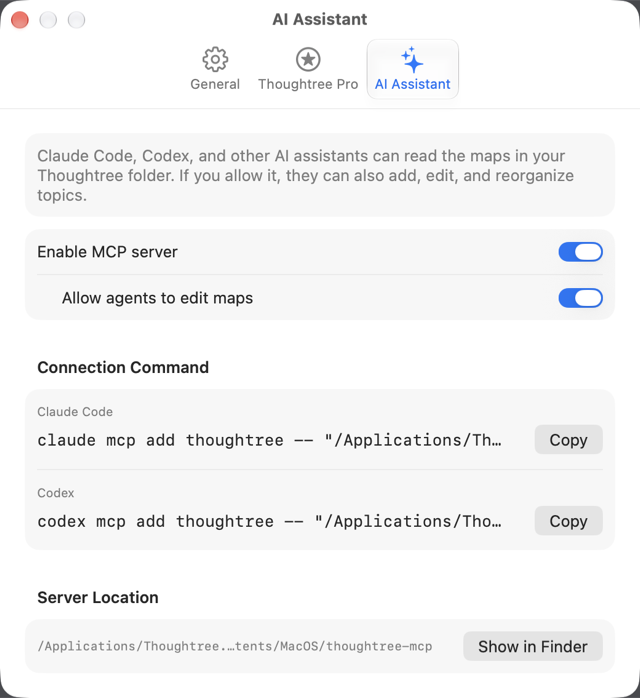
- Open Settings > AI Assistant
- Turn on Enable MCP server
- If you also want the assistant to add or change topics, turn on Allow agents to edit maps below it (not needed for read-only use)
- In the Connection Command section, click Copy next to Claude Code or Codex, then run the copied command in Terminal to register it (it looks like
claude mcp add thoughtree -- "…/thoughtree-mcp")
Without Pro, the toggles are disabled and an Upgrade to Pro… button appears instead.
What It Can Do
Only the read-only tools work while "Allow agents to edit maps" is off.
| Read-only | Read-write (also needs edit permission) |
|---|---|
| List your maps | Create a new map |
| Read a map's outline | Add topics |
| Search topics by keyword | Edit a topic (title, note, link, task) |
| List open tasks | Move or delete topics |
| List available themes | Apply a theme / export a map as an image |
| Rename a map / import one from text in another format | |
| View change history, or undo a change |
Privacy
This is off by default. It only runs once you turn it on and register the connection command with an AI assistant. Once enabled, whatever map content the assistant requests — topic text, notes, links, task info — is handed to that assistant on your Mac. What happens to it after that is governed by the policies of whoever provides the assistant (Anthropic, OpenAI, etc.). Thoughtree itself never sends map content to its own servers. Permission to edit is a separate switch from permission to read. To let you undo an assistant's changes, Thoughtree keeps the content from before each change on your device — up to 50 snapshots per document, for 7 days.
Troubleshooting
Thoughtree doesn't show whether a client is actually connected right now — only whether the feature is turned on.
- If the command doesn't work, go to Settings > AI Assistant and copy it again to make sure your assistant has the current path
- If tools aren't showing up or working as expected, check your Thoughtree Pro status and both toggles
- The helper's file location is shown under Server Location in the same tab, with a Show in Finder button